The contemporary audio software landscape is often bifurcated, split between rudimentary utilities and overly complex professional workstations. This creates a significant void—a demand for a tool that bridges the gap by pairing a streamlined, intuitive interface with robust analytical capabilities. The release of ocenaudio 3.20 marks a pivotal evolution in accessible audio editing, delivering uncompromising performance across all major operating systems. The project serves as a testament to the fact that high-efficiency signal processing can be seamlessly integrated into a free, cross-platform solution.
Built upon the Qt framework, Ocenaudio ensures seamless native performance across Windows, macOS, and Linux. Far from being a mere utility, it is a comprehensive audio manipulation environment designed to bridge the gap between consumer-grade software and professional-tier tools. By supporting the VST (Virtual Studio Technology) standard, the application grants users access to a vast ecosystem of third-party plugins, complementing its own robust suite of built-in effects. A primary focus has been placed on interactivity: real-time effect previews allow for the immediate adjustment of equalization, gain, or filtering, eliminating the need to wait for a full render.
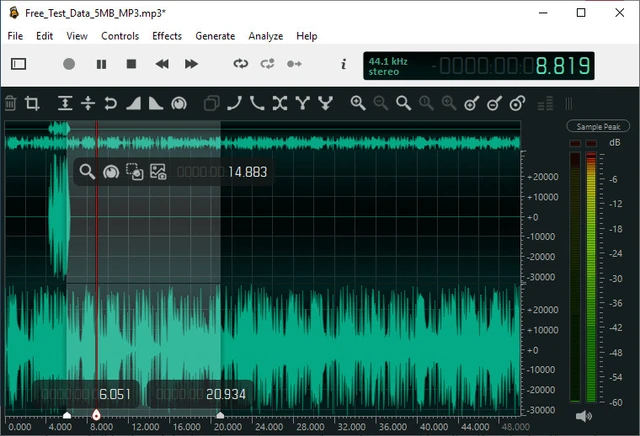
One of the program's most pivotal features is its multiple selection mechanism. In traditional editors, working with disparate fragments of a file requires a tedious, sequential workflow that significantly hampers productivity. Ocenaudio solves this by allowing users to select several non-contiguous segments of the audio stream simultaneously. This transforms routine tasks—such as normalizing vocals in a lengthy interview or scrubbing noise from various sections of a recording—into a single, streamlined operation.
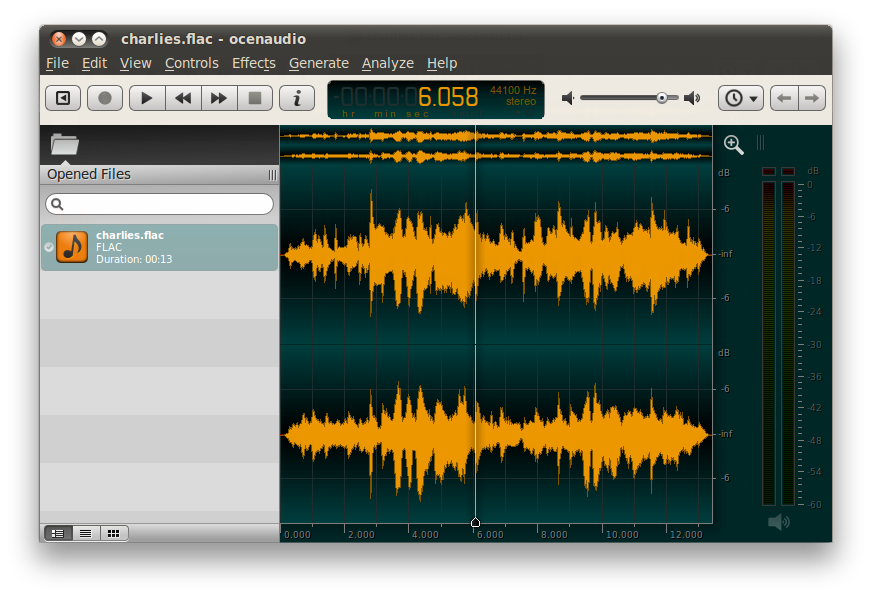
Ocenaudio’s technical edge is most apparent in its handling of large data arrays. Unlike many competitors that attempt to load an entire file into RAM upon opening, Ocenaudio employs a sophisticated memory management system. This architecture enables the application to process files of any duration—including multi-hour recordings—without crippling system resources. Copy, cut, and paste operations remain instantaneous even on mid-range hardware, making the editor an ideal choice for long-form podcasts or archival restoration.
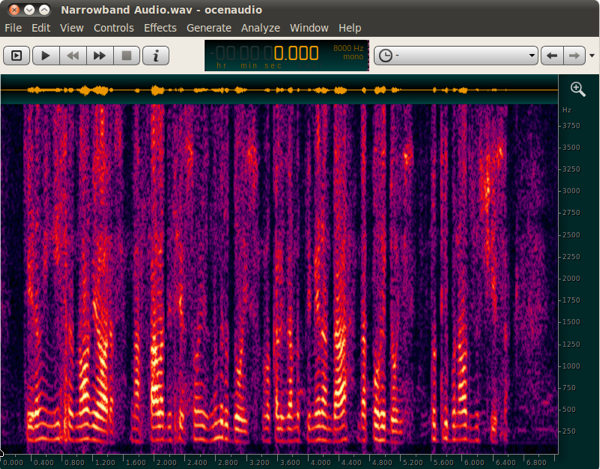
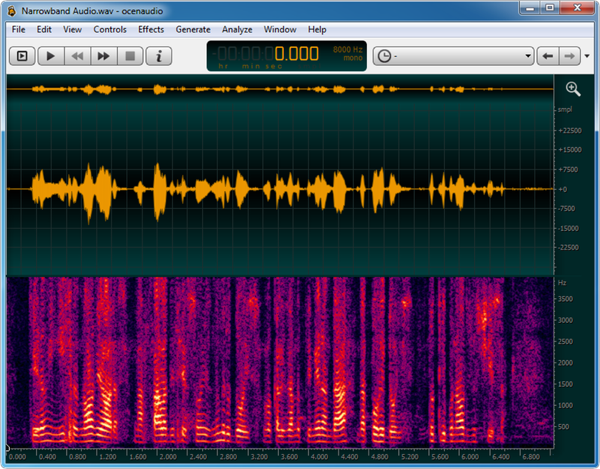
For granular signal analysis, the software integrates a high-precision spectrogram. This tool visualizes the spectral composition of the audio, which is critical for identifying hidden artifacts, clicks, or analyzing the frequency characteristics of a signal. Notably, all spectrogram settings are applied in real-time, providing instantaneous visual feedback as parameters are adjusted.
Version 3.20 introduces a sweeping functional overhaul that significantly expands its professional utility. The centerpiece of this update is full VST3 support. This standard surpasses VST2 through more efficient resource management and support for dynamic I/O. Accompanying this is a redesigned plugin manager, which now offers flexible mapping between VST2/VST3 versions and precise configuration of library search paths.
The editing workflow has been further automated with the introduction of "Trim Silence," allowing users to remove dead air from the beginning and end of a recording with a single click. Additionally, pause-aware selection has been implemented to simplify the precise slicing of audio material. For power users who prefer automation and terminal-based workflows, Ocenaudio now includes command-line tools for statistics gathering and metadata management.
The technical stack of supported formats in version 3.20 has expanded to an impressive scale. The editor now supports DSD import (DSF/DFF, including DST), opening the door for audiophiles and high-resolution audio specialists. Support for the DDP (Disc Description Protocol) has been added, including CD-Text and ISRC, rendering the software suitable for preparing materials according to the Red Book standard.
The supported codec list has grown to include formats such as WMA, Musepack (MPC), IMA-ADPCM XQ, as well as TTA and Vorbis within Matroska containers (.mka/.mkv). macOS users now benefit from integrated Apple AAC/ALAC encoders and decoders. Furthermore, read support has been extended to Dolby TrueHD, MLP, MPEG-4 ALS, TAK, RealAudio, and xWMA.
Rounding out the update are enhancements to the user interface and overall stability. File exporting and sample editing are now handled via an intuitive drag-and-drop mechanism directly into File Explorer or Finder. Additionally, a critical audio looping bug associated with DirectSound on Windows has been resolved, ensuring a more stable and predictable audio stream.
 The CPU Renaissance in the Age of AI