The modern web has evolved into a battlefield where social engineering converges with technical exploits to circumvent traditional security frameworks. Among the most insidious and stealthy attack vectors is clipboard manipulation—a technique that tricks users into unwittingly executing malicious code. To counter this threat, Opera has unveiled Paste Protect, a native security layer engineered to neutralize these sophisticated deception tactics. This development signals a fundamental shift in browser architecture: moving away from passive content filtering toward the active monitoring of system-level interactions.
At the heart of contemporary cybercrime lies the ability of threat actors to exploit the human element. One of the most sophisticated techniques to emerge in recent years is the "ClickFix" method. The scenario is deceptively straightforward: a user encounters a fake error message, a broken CAPTCHA, or a video that purportedly refuses to play. To "fix" the issue, the victim is prompted to copy a specific command and paste it into a terminal or the Windows "Run" dialog. This is where the security perimeter collapses; the user manually executes a malicious script that can install spyware, exfiltrate saved passwords, or grant an attacker remote access to the system.
Paste Protect was engineered specifically to sever this attack vector. The defense system is divided into two functional layers that operate in synergy to ensure comprehensive data security.
The first layer—Hijack Protection—was integrated into the browser back in 2021. Its primary objective is to prevent third-party applications from stealthily manipulating clipboard contents. This eliminates scenarios where a user copies one address or string of text, only to have it replaced by malicious content upon pasting.
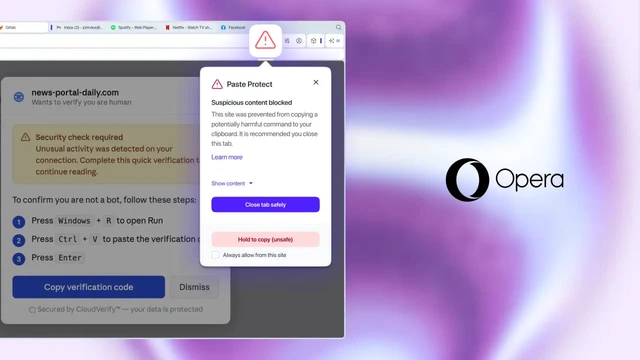
The second layer—Injection Protection—represents a more sophisticated analytical engine. It monitors clipboard content in real-time; if the system detects suspicious patterns or commands characteristic of malicious scripts, access to the data is immediately blocked. The user receives an instant risk notification, and a red exclamation mark appears in the address bar to signal the threat.
To ensure transparency and granular control, several management tools are provided. Users can preview the first 120 characters of a blocked fragment to understand the nature of the threat. For developers, there is the ability to add specific resources to an allowlist. Furthermore, a manual override mechanism has been implemented: if a user is absolutely certain of the data's safety, they can bypass the block by holding Ctrl+C for five seconds.
Currently, Opera is becoming the first major browser vendor to implement such functionality at the product's core level. In other popular solutions, similar protections are achieved exclusively through third-party extensions and plugins, which reduces overall system reliability and creates additional points of failure.
The urgency of this approach is underscored by alarming statistics regarding malware proliferation. For instance, the Lumma infostealer compromised nearly 400,000 Windows systems globally in a short period. The primary delivery channels were phishing campaigns and those same misleading CAPTCHAs that exploit user trust in the interface. The rollout of Paste Protect across desktop versions for Windows, macOS, Linux, and ChromeOS is a timely response to the evolution of threats where the human-computer interaction layer remains the weakest link.
 The CPU Renaissance in the Age of AI