In an era defined by the absolute hegemony of cloud services, concerns surrounding data privacy and the escalating costs of storage have reached a critical tipping point. Google appears to have recognized this shift, engineering a solution that pivots back toward the concept of local data ownership. A new automated backup feature, enabling seamless transfers from Android devices to Windows PCs, promises to liberate smartphone users from the shackles of recurring subscription fees. This represents a strategic maneuver toward a more profound integration of the two most dominant ecosystems in the modern computing landscape.
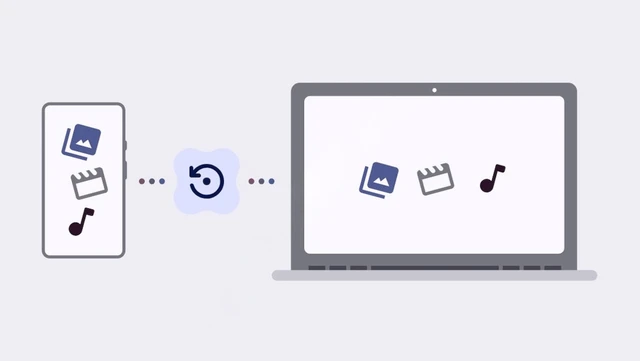
The modern user finds themselves caught in a tug-of-war between the seamless convenience of cloud synchronization and the escalating costs of expanding storage tiers. Against this backdrop, data unearthed in the latest Google Play Services update (version 26.26.33) regarding a new backup feature suggests a strategic pivot toward local solutions. Google is developing a tool designed to automatically migrate files from a smartphone to a Windows PC, completely bypassing the company's intermediary servers.
Technically, this functionality leverages the Quick Share infrastructure—a service that has evolved from Nearby Share into a robust bridge connecting mobile devices and desktops. To enable the process, users will need to install the corresponding Quick Share application on their PC. While a unified Google account is required for authentication and device pairing, the actual data traffic will remain confined to the local network. Consequently, sensitive files never leave the user's perimeter, with transfer speeds limited only by the bandwidth of the local Wi-Fi connection.
The synchronization process is envisioned as a seamless, background operation. The system will perform daily scans of the smartphone's media library, migrating new photos and videos to the PC's hard drive whenever both devices are on the same network and in close proximity. Google is also retaining manual control for the user, allowing backups to be triggered on demand without waiting for the automated cycle.
However, there is a conspicuous gap in this strategy: a total lack of support for Samsung devices. At first glance, this seems paradoxical given the massive market share commanded by the Galaxy series. The reason likely lies within the Korean giant's own ecosystem. Samsung has long offered Smart Switch, a powerful utility for creating comprehensive backups on Windows, macOS, and external storage drives.
Nevertheless, Smart Switch and Google's new feature address fundamentally different needs. Samsung's solution requires active user intervention and often necessitates a physical cable connection, whereas Google's development targets total automation and wireless transparency. The exclusion of Samsung from the supported device list could be the result of technical conflicts between proprietary protocols or the outcome of specific commercial agreements.
Ultimately, the implementation of automated local backups could serve as a powerful incentive for users seeking greater digital sovereignty. By forging a seamless bridge between Android and Windows, Google is doing more than just simplifying file transfers; it is crafting a viable alternative to Apple's closed and tightly controlled ecosystem, where the integration between iPhone and Mac has long been the gold standard for convenience.
 Qualcomm’s New Standard for Mobile Performance