For decades, the realm of systems administration has relied on the reliability and streamlined nature of classic SSH clients. Yet, even the most battle-tested tools eventually require an ergonomic overhaul to keep pace with the demands of modern workflows. The emergence of the modified PuTTY 0.84k-r2 build represents a strategic effort to marry the rock-solid stability of the original software with the flexibility of contemporary user interfaces. At the core of this update is the ambition to reclaim lost functionality from third-party forks, achieved through the integration of artificial intelligence tools.
PuTTY has long transcended its role as a mere remote access tool; it has evolved into an industry standard—a symbol of an era where raw functionality was prized far above aesthetic polish. Yet, beneath this deceptive simplicity lay a certain deficit in usability, which many power users sought to remedy through third-party modifications. The most prominent among these was KiTTY, which offered an expanded suite of session management tools and significant interface enhancements. Following the cessation of KiTTY's development several years ago, the community faced a dilemma: either resign themselves to the minimalism of vanilla PuTTY or find a way to integrate legacy improvements into the modern codebase.
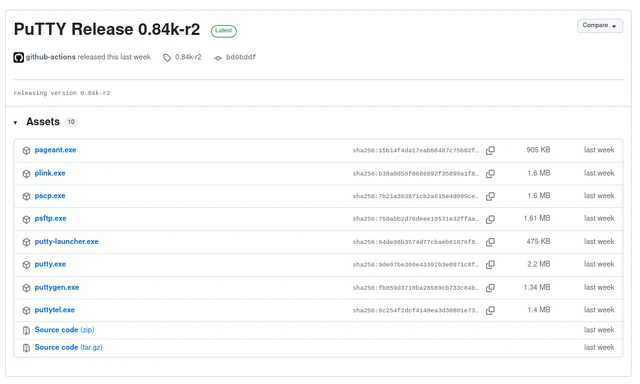
The release of build 0.84k-r2 is the definitive answer to this demand. Notably, the process of porting KiTTY's functionality into the current PuTTY codebase was achieved with the active assistance of neural network models, specifically ChatGPT and Codex. This underscores an emerging trend in software development: the use of LLMs not merely for generating new features, but for complex refactoring and "stitching" disparate versions of code together, significantly accelerating the maintenance of legacy tools. Crucially, these interventions were limited strictly to the user interface and interaction layer; the fundamental logic governing protocol operations remained untouched, ensuring that the client's legendary stability remains intact.
The most pivotal enhancement is the implementation of file-based storage for sessions and settings. In the classic version of PuTTY, data is stored within the Windows Registry, complicating migrations between machines or routine backups. Transitioning to standalone files renders the configuration portable and transparent. Alongside this, a series of "quality of life" improvements have been implemented: font sizes can now be adjusted via the familiar Ctrl + mouse wheel gesture, and windows automatically remember their coordinates and dimensions.
For those managing numerous concurrent connections, a dedicated system tray launcher has been introduced, transforming the terminal from a collection of disjointed windows into a structured workspace. Support for opening URLs via Ctrl+Shift+Click has also been added, substantially streamlining navigation through documentation directly from the console. Particular attention was paid to visual interaction: switching to an "xterm-style bitmap" cursor by default resolves a long-standing issue with incorrect cursor rendering in Midnight Commander, restoring precise positioning within file managers.
This modification is built upon the foundation of version 0.84, released in the spring of 2026. The base client continues to support a broad protocol stack—ranging from modern SSH to legacy Telnet, Rlogin, and SUPDUP—ensuring universal access to Unix-like systems and Windows environments. The openness of the MIT license allows initiatives like build 0.84k-r2 to exist and evolve, proving that even in the age of cloud consoles, the local terminal remains an indispensable tool in the hands of a professional.
 The CPU Renaissance in the Age of AI