Managing GPU thermals is paramount to ensuring the stability and longevity of contemporary high-performance hardware. However, the launch of the Blackwell series introduced a frustrating hurdle: Nvidia obscured "Hot Spot" temperature readings, leaving users with only aggregated averages. This move set a precarious precedent, potentially masking underlying hardware defects until they trigger aggressive thermal throttling. Restoring access to this telemetry via third-party utilities reinstates essential transparency, equipping enthusiasts and professionals with the granular diagnostic tools required for comprehensive system health monitoring.
The saga of the GeForce RTX 50 series began with a wave of confusion among enthusiasts and technical specialists. In previous generations, tools such as GPU-Z and MSI Afterburner provided a comprehensive view of a GPU's thermal state, including the "Hotspot"—the temperature of the single hottest point on the silicon die. However, with the Blackwell architecture, this metric abruptly vanished from public view, leaving users with only the average GPU temperature and memory readings. For some time, the prevailing theory was that Nvidia had intentionally omitted the dedicated Hotspot sensor in the new hardware implementation.
As it turned out, the reality was quite different: the sensor hadn't disappeared; it had simply been gated at the driver level. The truth surfaced following an analysis of MODS (Modular Diagnostic Software), an internal diagnostic package Nvidia utilizes for servicing and internal testing. Using this tool, it was confirmed that Hotspot telemetry is still being reported by the system, but access for third-party applications has been blocked by a software filter.
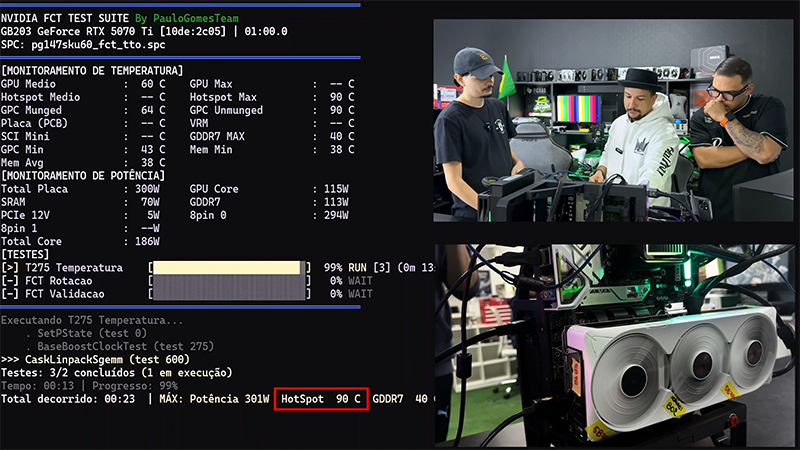
The practical significance of this hidden metric became glaringly obvious during a specific case involving a GeForce RTX 5070 Ti. The owner noticed a peculiar anomaly: despite a moderate average GPU temperature hovering around 68°C, the cooling system was running at full throttle and performance suffered from intermittent dips. Deep diagnostics via MODS revealed a staggering figure—the Hotspot was hitting 107°C. This specific threshold acts as the trigger for protective mechanisms that forcibly downclock the processor to prevent physical damage to the die.
The culprit was a straightforward assembly defect: poor contact between the heatsink and the die, coupled with uneven distribution of the thermal interface material. In this scenario, the average temperature remained within normal limits because most of the chip was being cooled effectively, but localized overheating in one zone created a "thermal bottleneck." Only after replacing the thermal paste and ensuring a tight seal between the cooler and the GPU were peak temperatures brought down to acceptable levels and the throttling eliminated.
This case highlights the fundamental distinction between average GPU temperature and the Hotspot. While the average provides a general overview of system health, the Hotspot is the only way to identify critical mounting flaws or the degradation of the thermal interface. Without this metric, a user sees a "healthy" card that is, in reality, operating under constant stress and accelerated wear.
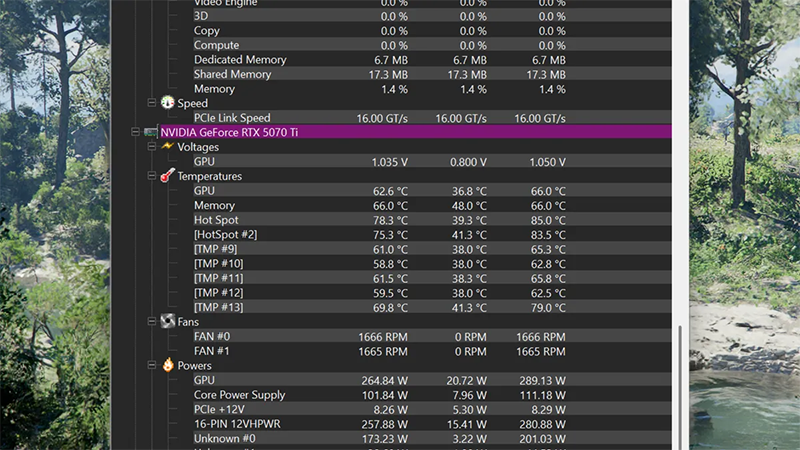
The response from software developers was swift. HWMonitor version 1.65 implemented a workaround to bypass these restrictions, restoring the ability for RTX 50 owners to see the actual thermal picture. Similar capabilities are already being integrated into the beta versions of HWInfo and are slated for release in CapFrameX.
Currently, there is no evidence of systemic cooling defects across the Blackwell series. Tests on healthy units show a standard temperature delta between the average value and the Hotspot within the 12–22°C range, which is typical for modern high-performance chips. Nevertheless, the return of telemetry transparency is a vital step: users can now independently diagnose cooling issues without relying on proxy indicators like fan noise or sudden FPS drops.
 The CPU Renaissance in the Age of AI